Hey, this is Jacky. An average guy floating around the internet abyss.
Why create this blog?
- Keep track of what I have done (so I don’t forget in minutes)
- Maybe somebody needs this info to get started
Why not a blogging platform?
- I could version control my blog content and build it right away
- I could move whatever I wanted to, as this site is static
- It’s boring to click and blog
How did I make this blog?
I’m using this template
powered by Hugo
.
It’s simple and clean enough for me to use it as a blogging platform.
Hugo has a huge theme collection for different purposes. You can browse them here
.
- Install
hugoin your local environment. I usebrewbecause I do this on my Mac Mini.
➜ brew install hugo
- Go to your development folder and create a new site
➜ hugo new site your-lovely-blog-name
Different themes require different installation procedures. Please take a look at their GitHub instructions.
The following steps are for this specific theme.
- Create an additional folder to version control your blog post and static content (if any)
➜  mkdir -p your-blog-content/content/posts
➜  mkdir -p your-blog-content/static
- Enter your your-lovely-blog-name directory, clone the theme and set the Hugo theme to hugo-theme-m10c
➜  cd your-lovely-blog-name
➜  git clone https://github.com/vaga/hugo-theme-m10c.git themes/hugo-theme-m10c
➜  echo 'theme = "hugo-theme-m10c"' >> hugo.toml
- Move the
hugo.tomlto your-blog-content and symlink it to the your-lovely-blog-name folder.
Symlinking the content makes.gitignorea bit less annoying.
➜  mv hugo.toml ../your-blog-content/.
➜  ln -s ../your-blog-content/static static
➜  ln -s ../your-blog-content/content content
➜  ln -s ../your-blog-content/hugo.toml hugo.toml
- Don’t rush into creating content. Test it before you continue.
➜ hugo server
Go to http://127.0.0.1:1313 in your browser and you should see something like this.
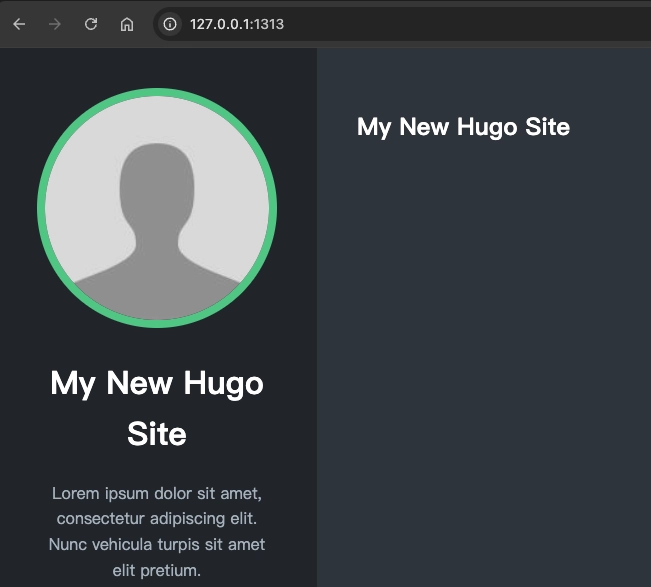
And you have your first static site generated.
Next up: writing the first post and configuring a few things.